# Avatar Model Generation
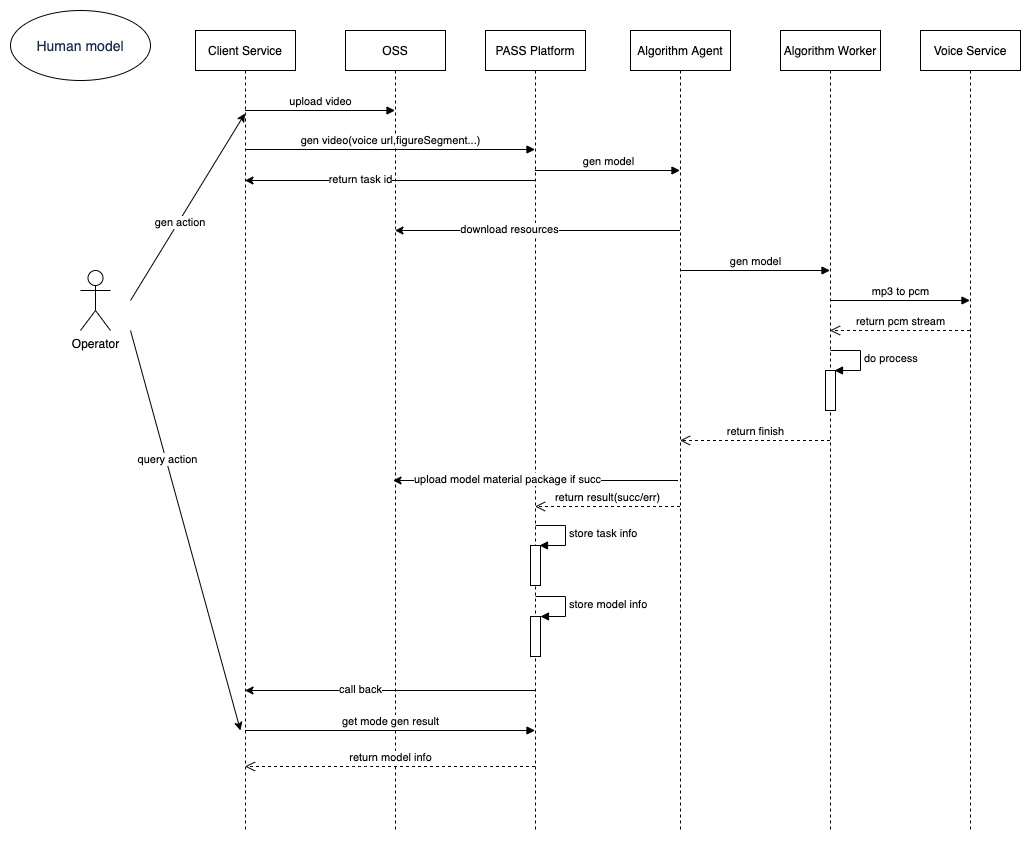
The avatar model generation service can produce AI-driven digital human avatar models that are virtually indistinguishable from real people, based on videos captured or recorded by real humans uploaded by users. To perfectly clone a human likeness, please follow the SenseTime Digital Human Capture and Production Specifications during filming. The content includes video and audio for 2D digital human training and testing. For details, refer to: Capture Specifications (opens new window). The PaaS platform supports 7-day online storage; timely transfer is required, as generated content will no longer be available for download after 7 days.
# Avatar Model Generation Sequence Diagram
# Avatar Model Update
The 2D digital human avatar model update service allows updating avatar models that have already been generated, supporting modification of digital human training motion segments. The PaaS platform supports 7-day online storage; timely transfer is required, as generated content will no longer be available for download after 7 days.
# Green Screen Segmentation Effect Preview
The platform supports green screen segmentation effect preview for images and videos, allowing users to confirm green screen segmentation parameter effects before formally submitting avatar model generation tasks, or to verify whether the filming environment meets shooting requirements before official filming.
# API Reference
To call all API services on the platform, users must access the service endpoint: aigc.softsugar.com, and include the token information in the request header.
# Create Avatar Model Generation Task
# API Description
Generates avatar models based on one or more videos uploaded by the user and specified content using algorithmic capabilities. Supports producing one or more model files in a single training session. The algorithm ultimately returns compressed packages and thumbnail files of avatar models for user download. Please refer to the Capture Specifications (opens new window) for uploaded video content. The PaaS platform supports 7-day online storage; timely transfer is required, as generated content will no longer be available for download after 7 days. If the avatar model generation results are unsatisfactory, please refer to the case-specific solutions described above for training parameter adjustments.
Supports standard digital human training and premium digital human training.
# Request URL
POST
/api/2dvh/v1/material/2davatar/model/multi/create
# Request Headers
Content-Type:
application/json
# Request Parameters
| Field | Type | Required | Description |
|---|---|---|---|
materialName | String | True | Avatar model material name; only one name is supported per training task |
videoUrl | String | True | Base video material download URL; the base video must be at least 6 minutes long |
param | String | True | Correct param information must be passed in to create a multi-video avatar model generation task, including various parameters (this parameter is a JSON-escaped string). Please refer to the parameter descriptions and JSON examples below |
# param Parameter Description
| Field | Type | Required | Description |
|---|---|---|---|
persistent | Object | True | Global model parameters. |
- avatarType | Integer | False | Integer type, default is 0. (0: Digital Human, 1: Static-Dynamic Digital Human, 2: Action-Editing Digital Human, 3: Quick Digital Human, 4: Super Live Room Digital Human, 5: Super Live Room Digital Human Pro) |
- videoCrfQuality | Integer | True | CRF parameter for video encoding quality; lower values mean higher quality but larger files. Default is 23, range 0–51, recommended 14–28 |
- stage01GenMode | Integer | False | Whether to use the person's own lip-sync for training. Default is 1; 0 means using algorithm-generated lip-sync directly, producing the same FFID; 1 means using the person's own lip-sync for training, generating different and unique FFIDs |
- stage1Config | Array | True | Avatar model lip-sync training configuration. Effective when using the person's own lip-sync for training, default is 0; 0 means generating original lip-sync model; 1 means generating universal lip-sync model. Users can later manually switch between the two lip-sync models based on actual results |
- dev | Object | False | Video material model training configuration |
- - stage2 | Object | False | Video material model training configuration |
- - - config | Integer | True | Video material model training configuration, model resolution. Default is 0 for 2K resolution model; 1 for 4K resolution model; 4 for Super Live Room 4K ultra-HD model. Note: Currently Live/Interactive Digital Human/Super Live Room Pro only supports 2K resolution models; Super Live Room 4K optimized model is currently only available for Volcengine use. |
- multiFaces | Boolean | False | Whether the avatar model is a multi-person model |
- templateFacePic | String | False | Front-facing photo of the designated driving person for multi-person avatar model training. Should be clear and unobstructed. Required when multiFaces=true |
personal | String | True | Base video parameters. If auxiliary video is not provided, base video parameters will be used for processing. |
- segmentStyle | Integer | True | Background segmentation method: 0: No segmentation, 1: Green screen segmentation, 2: Normal segmentation, 3: Green screen post-processing (GPU post-processing during video synthesis, this method only supports video synthesis) |
- removeGreenEdge | Boolean | False | Effective when segmentStyle=2, default is false. Removes green edges around the person |
- greenParamsRefinethHBgr | Integer | False | Effective when segmentStyle=1 or 3, default 160, range 0–255; refine alpha high threshold (for red/green/blue backgrounds). Controls background retention level; higher values retain more background |
- greenParamsRefinethLBgr | Integer | False | Effective when segmentStyle=1 or 3, default 40, range 0–255; refine alpha low threshold (for red/green/blue backgrounds). Controls body/object edge retention width; higher values retain more |
- greenParamsBlurKs | Integer | False | Effective when segmentStyle=1 or 3, default 3; smoothness. Denoising blur coefficient, must be ≥0. Higher smoothness means smoother results but affects edges. If black edges or color artifacts appear at edges, increase this value; if edge erosion occurs, decrease this value appropriately |
- greenParamsColorbalance | Integer | False | Effective when segmentStyle=1 or 3, default 100. Green removal intensity, range 0–100; higher values mean stronger green removal |
- greenParamsSpillByalpha | Double | False | Effective when segmentStyle=1 and 3, default 0.5. Green removal color balance, range [-1.0 ~ 1.0]; 0~1 reduces color cast, -1~0 enhances color. Values below 0.5 cause yellow color cast, values above 0.5 cause cyan/blue color cast. For blue screen segmentation, the default value should be changed to 0.0 |
- greenParamsSamplePointBgr | int[] | False | Effective when segmentStyle=1 or 3. Sampling color, consisting of three values each ranging 0–255, e.g., [0, 255, 0]. For blue screen segmentation, the default value should be changed to [255, 0, 0] |
- assetStart | Float | False | Clip video material start time (seconds) (This parameter is invalid for premium digital humans) |
- assetEnd | Float | False | Clip video material end time (seconds) (This parameter is invalid for premium digital humans) |
- assetScale | Float | False | Video material scale ratio (default 1.0) |
- actionChange | Object | False | Premium digital human related parameters. This group of parameters is effective when support=true, indicating the trained digital human type is a premium digital human. The actionChange and actionEdit sections are mutually exclusive; please avoid setting both groups of parameters to true simultaneously. |
- - support | Boolean | True | Whether premium digital human is supported; true for premium digital human. |
- - staticRangeStart | Float | True | Static material start time (seconds) (Premium digital human only) |
- - staticRangeEnd | Float | True | Static material end time (seconds) (Premium digital human only) |
- - dynamicRangeStart | Float | True | Dynamic material start time (seconds) (Premium digital human only) |
- - dynamicRangeEnd | Float | True | Dynamic material end time (seconds) (Premium digital human only) |
- - gap | Integer | False | Maximum interval frames for cut points (default 75) |
- actionEdit | Object | False | Action-editing digital human related parameters. This group of parameters is effective when support=true, indicating the trained digital human type is an action-editing digital human. The actionChange and actionEdit sections are mutually exclusive; please avoid setting both groups of parameters to true simultaneously. |
- - support | Boolean | True | Whether action editing is supported; true means supported. |
- - videoPath | String | True | Dynamic material file URL |
- - gap | Integer | False | Maximum interval frames for cut points (default 25) |
- - actionList | Array | True | Action list |
- - - name | String | True | Action name |
- - - clipRangeStart | Float | True | Start time (seconds) |
- - - clipRangeEnd | Float | True | End time (seconds) |
- - - description | String | False | Text description of the action |
override | Array | False | Auxiliary video information. (This group of parameters is invalid for premium digital humans and action-editing digital humans). Effective when avatarType = 0/3/4/5 |
- videoUrl | String | True | Auxiliary video URL; if auxiliary video is not configured, parameters from personal will be used |
- maskVideoUrl | String | False | Custom mask video URL. Required when segmentStyle is 4; the mask video frame count must strictly align frame-by-frame with the auxiliary video |
- segmentStyle | Integer | True | Background segmentation method: 0: No segmentation, 1: Green screen segmentation, 2: Normal segmentation, 3: SDK green screen post-processing (GPU post-processing during video synthesis), 4: Custom mask segmentation — you can provide a custom mask video for the auxiliary video. Note: The mask video frame count must align frame-by-frame with the auxiliary video |
- removeGreenEdge | Boolean | False | Effective when segmentStyle=2, default is false. Removes green edges around the person |
- greenParamsRefinethHBgr | Integer | False | Effective when segmentStyle=1 or 3, default 160, range 0–255; refine alpha high threshold (for red/green/blue backgrounds). Controls background retention level; higher values retain more background |
- greenParamsRefinethLBgr | Integer | False | Effective when segmentStyle=1 or 3, default 40, range 0–255; refine alpha low threshold (for red/green/blue backgrounds). Controls body/object edge retention width; higher values retain more |
- greenParamsBlurKs | Integer | False | Effective when segmentStyle=1 or 3, default 3; smoothness. Denoising blur coefficient, must be ≥0. Higher smoothness means smoother results but affects edges. If black edges or color artifacts appear at edges, increase this value; if edge erosion occurs, decrease this value appropriately |
- greenParamsColorbalance | Integer | False | Effective when segmentStyle=1 or 3, default 100. Green removal intensity, range 0–100; higher values mean stronger green removal |
- greenParamsSpillByalpha | Double | False | Effective when segmentStyle=1 and 3, default 0.5. Green removal color balance, range [-1.0 ~ 1.0]; 0~1 reduces color cast, -1~0 enhances color. Values below 0.5 cause yellow color cast, values above 0.5 cause cyan/blue color cast. For blue screen segmentation, the default value should be changed to 0.0 |
- greenParamsSamplePointBgr | int[] | False | Effective when segmentStyle=1 or 3. Sampling color, consisting of three values each ranging 0–255, e.g., [0, 255, 0]. For blue screen segmentation, the default value should be changed to [255, 0, 0] |
- assetStart | Float | False | Clip video material start time (seconds). Required for Super Live Room replication. |
- assetEnd | Float | False | Clip video material end time (seconds). Required for Super Live Room replication. |
- assetScale | Float | False | Video material scale ratio (default 1.0). Required for Super Live Room replication. |
- name | String | False | Name of this material segment; does not participate in training, used for record-keeping. Required for Super Live Room replication. |
- description | String | False | Description of this material segment; does not participate in training, used for record-keeping. Required for Super Live Room replication. |
# Request Example
{
  "materialName": "534",
  "videoUrl": "https://xxx/materials/33/demo_20230228104258028_20230720185601860.mp4",
  "param": "{\"personal\":{\"segmentStyle\":1,\"removeGreenEdge\":false,\"greenParamsRefinethHBgr\":180,\"greenParamsRefinethLBgr\":50,\"greenParamsBlurKs\":3,\"greenParamsColorbalance\":90,\"greenParamsSpillByalpha\":0.4,\"greenParamsSamplePointBgr\":[0,255,0],\"assetStart\":0.1,\"assetEnd\":0.6,\"assetScale\":1},\"persistent\":{\"videoCrfQuality\":23,\"stage1Config\":[0,1],\"dev\":{\"stage2\":{\"config\":1}}},\"override\":[{\"videoUrl\":\"https://aigc-video-saas.oss-cn-hangzhou.aliyuncs.com/AIGC/online/vendor/24/customization/1700120490581/package_1700120490581.mp4\",\"segmentStyle\":1,\"removeGreenEdge\":false,\"greenParamsRefinethHBgr\":180,\"greenParamsRefinethLBgr\":50,\"greenParamsBlurKs\":3,\"greenParamsColorbalance\":90,\"greenParamsSpillByalpha\":0.4,\"greenParamsSamplePointBgr\":[0,255,0],\"assetStart\":0.1,\"assetEnd\":0.6,\"assetScale\":1},{\"videoUrl\":\"https://dwg-aigc-paas.oss-cn-hangzhou.aliyuncs.com/demo.mp4\",\"segmentStyle\":1,\"removeGreenEdge\":false,\"greenParamsRefinethHBgr\":180,\"greenParamsRefinethLBgr\":50,\"greenParamsBlurKs\":3,\"greenParamsColorbalance\":90,\"greenParamsSpillByalpha\":0.4,\"greenParamsSamplePointBgr\":[0,255,0],\"assetStart\":0.1,\"assetEnd\":0.6,\"assetScale\":1}]}"
}
# Response Elements
| Field | Type | Required | Description |
|---|---|---|---|
code | Integer | True | 0 - Success, Other - Error |
message | String | True | Error details |
data | Object | False | Task ID |
# Response Example
{
    "code": 0,
    "message": "success",
    "data": 1
}
# Create Avatar Model Update Task
# API Description
The motion segments displayed by the 2D digital human are extracted from the training video. By default, the segment runs from the first second of speaking to a duration of 3 minutes and 30 seconds. If you are not satisfied with the 2D digital human's motion segments, you can modify them through this API to adjust the displayed motion duration and content. Please note that when using the avatar model update feature, it is recommended to keep the background segmentation method consistent with the one selected during the original model file generation. Changing the segmentation method may cause effect anomalies. The PaaS platform supports 7-day online storage; timely transfer is required, as generated content will no longer be available for download after 7 days.
# Request URL
POST
/api/2dvh/v1/material/2davatar/model/rebuilding/video
# Request Headers
Content-Type:
application/json
# Request Parameters
| Field | Type | Required | Description |
|---|---|---|---|
materialName | String | True | Avatar model material name |
videoUrl | String | True | Video material download URL |
modelUrl | String | True | Download URL of the previously generated original model file |
avatarType | Integer | False | Integer type, default is 0. (0: Digital Human, 1: Static-Dynamic Digital Human, 2: Action-Editing Digital Human, 4: Super Live Room Digital Human, 5: Super Live Room Digital Human Pro) |
segmentStyle | Integer | True | Background segmentation method: 0: No segmentation, 1: Green screen segmentation, 2: Normal segmentation, 3: SDK green screen post-processing (GPU post-processing during video synthesis) |
removeGreenEdge | Boolean | False | Effective when segmentStyle=2, default is false. Removes green edges around the person |
greenParamsRefinethHBgr | Integer | False | Effective when segmentStyle=1 or 3, default 160, range 0–255; refine alpha high threshold (for red/green/blue backgrounds). Controls background retention level; higher values retain more background |
greenParamsRefinethLBgr | Integer | False | Effective when segmentStyle=1 or 3, default 40, range 0–255; refine alpha low threshold (for red/green/blue backgrounds). Controls body/object edge retention width; higher values retain more |
greenParamsBlurKs | Integer | False | Effective when segmentStyle=1 or 3, default 3; smoothness. Denoising blur coefficient, must be ≥0. Higher smoothness means smoother results but affects edges. If black edges or color artifacts appear at edges, increase this value; if edge erosion occurs, decrease this value appropriately |
greenParamsColorbalance | Integer | False | Effective when segmentStyle=1 or 3, default 100. Green removal intensity, range 0–100; higher values mean stronger green removal |
greenParamsSpillByalpha | Double | False | Effective when segmentStyle=1 and 3, default 0.5. Green removal color balance, range [-1.0 ~ 1.0]; 0~1 reduces color cast, -1~0 enhances color. Values below 0.5 cause yellow color cast, values above 0.5 cause cyan/blue color cast. For blue screen segmentation, the default value should be changed to 0.0 |
greenParamsSamplePointBgr | int[] | False | Effective when segmentStyle=1 or 3. Sampling color, consisting of three values each ranging 0–255, e.g., [0, 255, 0]. For blue screen segmentation, the default value should be changed to [255, 0, 0] |
videoCrfQuality | Integer | False | CRF parameter for video encoding quality; lower values mean higher quality but larger files. Default is 23, range 0–51, recommended 14–28 |
assetStart | Float | False | Clip video material start time (seconds) |
assetEnd | Float | False | Clip video material end time (seconds) |
assetScale | Float | False | Video material scale ratio (default 1.0) |
actionChange | Object | False | Static-dynamic switching parameters |
- support | Boolean | True | Whether material action switching is supported |
- staticRangeStart | Float | True | Static material start time (seconds) |
- staticRangeEnd | Float | True | Static material end time (seconds) |
- dynamicRangeStart | Float | True | Dynamic material start time (seconds) |
- dynamicRangeEnd | Float | True | Dynamic material end time (seconds) |
- gap | Integer | False | Maximum interval frames for cut points (default 75) |
actionEdit | Object | False | Action list related parameters; effective when support=true |
- support | Boolean | True | Whether action editing is supported; true means supported. |
- videoPath | String | True | Dynamic material file URL |
- gap | Integer | False | Maximum interval frames for cut points (default 25) |
- actionList | Array | True | Action list |
- - name | String | True | Action name |
- - clipRangeStart | Float | True | Start time (seconds) |
- - clipRangeEnd | Float | True | End time (seconds) |
- - description | String | False | Text description of the action |
# Request Example
{
  "materialName": "2d任务A",
  "videoUrl": "https://xxx.oss-cn-hangzhou.aliyuncs.com/xxx/audio1.mp4",
  "modelUrl": "https://xxx.oss-cn-hangzhou.aliyuncs.com/xxx/model1.zip",
  "assetStart": 0.0,
  "assetEnd": 120.0,
  "assetScale": 1.0,
  "segmentStyle": 1,
  "devStage2Config": 0,
  "stage1Template": 0,
  "greenParamsRefinethHBgr": 167,
  "greenParamsRefinethLBgr": 17,
  "greenParamsBlurKs": 7,
  "segmentGreenUseGpu":false,
  "greenParamsColorbalance": 97,
  "greenParamsSpillByalpha": 0.3,
  "greenParamsSamplePointBgr": [
    7,
    275,
    7
  ],
  "videoCrfQuality": 21
}
# Parameter Notes
In most cases, the default parameters can accommodate the majority of scenarios. However, when effect issues arise due to different scenario performances, parameters need to be adjusted accordingly. Below are recommended parameter settings for some typical scenarios.
- General Scenario Parameters (Default)
These parameters are designed to accommodate most scenarios, using the default parameter values described above.
- Adjusting Parameters for Unclear Digital Human Video Quality
Method 1: Reduce the video encoding quality parameter (videoCrfQuality). When set to 14, the digital human material clarity aligns with the original footage. This method may slightly increase material file size.
Method 2: Appropriately add sharpening values in the video synthesis or live stream creation input request. Specifically, increase the sharpen value under the beautify object in the JSON definition.
Method 3: Choose the 4K version for training the digital human, but note that resolution cannot be changed during updates.
- Adjusting Parameters for Black Edges with Slight Green Reflection on Person Edges (High occurrence rate, especially in white clothing scenarios)
Please refer to the following parameters for avatar model update (rebuilding), simultaneously reducing background retention level and person edge retention width. This method is mainly suitable for green screen segmentation scenarios. Reference values:
{
  "materialName": "534",
  "segmentStyle": 1,
  "removeGreenEdge": false ,
  "assetScale": 1,
  "greenParamsRefinethHBgr": 90,
  "greenParamsRefinethLBgr": 10,
  "greenParamsBlurKs": 3,
  "greenParamsColorbalance": 100,
  "greenParamsSpillByalpha": -0.3,
  "greenParamsSamplePointBgr": [
    0,
    275,
    0
  ],
  "videoCrfQuality": 21,
  "videoUrl": "https://xxx/materials/33/demo_20230228104258028_20230720185601860.mp4"
}
- Adjusting Parameters for Green Edges on Person or Overall Green Tint
You can reduce the green removal balance parameter. Lower values mean stronger green removal but are more likely to cause color shifts — for example, removing the green component from lemon yellow turns it orange. A minimum setting of -0.3 is recommended. This method enhances colors and is suitable when there is no yellow in the scene. It supports both green screen segmentation and normal segmentation. Reference values:
{
  "materialName": "534",
  "segmentStyle": 2,
  "removeGreenEdge": true ,
  "greenParamsSpillByalpha": -0.3,
  "videoCrfQuality": 21,
  "videoUrl": "https://xxx/materials/33/demo_20230228104258028_20230720185601860.mp4"
}
- Adjusting Parameters for Large Cheek Movement Amplitude with Gray Edges at Cheek or Neck Positions
This occurs because the initial material segmentation result does not match the driven digital human's cheek edges. It is necessary to use green screen post-processing (segmentStyle=3) for training. This is mainly suitable for digital humans processed with green screen segmentation.
# Response Elements
| Field | Type | Required | Description |
|---|---|---|---|
code | Integer | True | 0 - Success, Other - Error |
message | String | True | Error details |
data | Object | False | Task ID |
# Response Example
{
    "code": 0,
    "message": "success",
    "data": 1
}
# Create Image Green Screen Segmentation Effect Preview Task
# API Description
Image green screen segmentation effect preview
# Request URL
POST
/api/2dvh/v1/material/2davatar/model/green/segment/image/create
# Request Headers
Content-Type:
application/json
# Request Parameters
| Field | Type | Required | Description |
|---|---|---|---|
materialName | String | True | Image green screen segmentation effect preview task name |
url | String | True | Image material download URL |
param | String | True | Correct param information must be passed in for the image green screen segmentation effect preview task, including various parameters (this parameter is a JSON-escaped string). Please refer to the parameter descriptions and JSON examples below |
# param Parameter Description
| Field | Type | Required | Description |
|---|---|---|---|
greenParamsRefinethHBgr | Integer | False | Default 160, range 70–220. Refine alpha high threshold (for red/green/blue backgrounds). Controls background retention level; higher values retain more background |
greenParamsRefinethLBgr | Integer | False | Default 40, range 10–80. Refine alpha low threshold (for red/green/blue backgrounds). Controls body/object edge retention width; higher values retain more |
greenParamsBlurKs | Integer | False | Default 3, range 1–24. Smoothness; denoising blur coefficient, must be ≥0. Higher smoothness means smoother results but affects edges. If black edges or color artifacts appear at edges, increase this value; if edge erosion occurs, decrease this value appropriately. |
greenParamsColorbalance | Integer | False | Default 100. Green removal intensity, range 0–100; higher values mean stronger green removal |
greenParamsSpillByalpha | Double | False | Default 0.5. Green removal color balance, range [-1.0 ~ 1.0]; 0~1 reduces color cast, -1~0 enhances color. Values below 0.5 cause yellow color cast, values above 0.5 cause cyan/blue color cast. For blue screen segmentation, the default value should be changed to 0.0 |
greenParamsSamplePointBgr | int[] | False | Sampling color, consisting of three values each ranging 0–255, e.g., [0, 255, 0]. For blue screen segmentation, the default value should be changed to [255, 0, 0] |
greenParamsSampleBackground | object | False | Background parameters. Please refer to the parameter descriptions and JSON examples below |
# greenParamsSampleBackground Parameter Description
| Field | Type | Required | Description |
|---|---|---|---|
color | int[] | False | Default [0,255,0], RGB color values, range 0–255 |
# Request Example
{
  "materialName": "534",
  "url": "https://xxx/materials/33/demo_20230228104258028_20230720185601860.mp4",
  "param": "{\"green_params_refineth_h_bgr\":230,\"green_params_refineth_l_bgr\":70,\"green_params_blur_ks\":3,\"green_params_colorbalance\":100,\"green_params_spill_byalpha\":0,\"green_params_sample_point_bgr\":[0,255,0],\"green_params_sample_background\":{\"color\":[0,100,255]}}"
}
# Response Elements
| Field | Type | Required | Description |
|---|---|---|---|
code | Integer | True | 0 - Success, Other - Error |
message | String | True | Error details |
data | Object | False | Task information |
- id | Long | True | Task ID |
- url | String | True | Image URL |
# Response Example
{
  "code": 0,
  "message": "success",
  "data": 1
}
# Video Green Screen Segmentation Effect Preview
# API Description
Video green screen segmentation effect preview
# Request URL
POST
/api/2dvh/v1/material/2davatar/model/green/segment/video/create
# Request Headers
Content-Type:
application/json
# Request Parameters
| Field | Type | Required | Description |
|---|---|---|---|
materialName | String | True | Video green screen segmentation effect preview task name |
url | String | True | Base video material download URL; the base video must be at least 6 minutes long |
param | String | True | Correct param information must be passed in for the video green screen segmentation effect preview task, including various parameters (this parameter is a JSON-escaped string). Please refer to the parameter descriptions and JSON examples below |
# param Parameter Description
| Field | Type | Required | Description |
|---|---|---|---|
greenParamsRefinethHBgr | Integer | False | Default 160, range 70–220. Refine alpha high threshold (for red/green/blue backgrounds). Controls background retention level; higher values retain more background |
greenParamsRefinethLBgr | Integer | False | Default 40, range 10–80. Refine alpha low threshold (for red/green/blue backgrounds). Controls body/object edge retention width; higher values retain more |
greenParamsBlurKs | Integer | False | Default 3, range 1–24. Smoothness; denoising blur coefficient, must be ≥0. Higher smoothness means smoother results but affects edges. If black edges or color artifacts appear at edges, increase this value; if edge erosion occurs, decrease this value appropriately. |
greenParamsColorbalance | Integer | False | Default 100. Green removal intensity, range 0–100; higher values mean stronger green removal |
greenParamsSpillByalpha | Double | False | Default 0.5. Green removal color balance, range [-1.0 ~ 1.0]; 0~1 reduces color cast, -1~0 enhances color. Values below 0.5 cause yellow color cast, values above 0.5 cause cyan/blue color cast. For blue screen segmentation, the default value should be changed to 0.0 |
greenParamsSamplePointBgr | int[] | False | Sampling color, consisting of three values each ranging 0–255, e.g., [0, 255, 0]. For blue screen segmentation, the default value should be changed to [255, 0, 0] |
greenParamsSampleBackground | object | False | Background parameters. Please refer to the parameter descriptions and JSON examples below |
# greenParamsSampleBackground Parameter Description
| Field | Type | Required | Description |
|---|---|---|---|
color | int[] | False | Default [0,255,0], RGB color values, range 0–255 |
# Request Example
{
  "materialName": "534",
  "url": "https://xxx/materials/33/demo_20230228104258028_20230720185601860.mp4",
  "param": "{\"green_params_refineth_h_bgr\":230,\"green_params_refineth_l_bgr\":70,\"green_params_blur_ks\":3,\"green_params_colorbalance\":100,\"green_params_spill_byalpha\":0,\"green_params_sample_point_bgr\":[0,255,0],\"green_params_sample_background\":{\"color\":[0,100,255]}}"
}
# Response Elements
| Field | Type | Required | Description |
|---|---|---|---|
code | Integer | True | 0 - Success, Other - Error |
message | String | True | Error details |
data | Object | False | Task ID |
# Response Example
{
  "code": 0,
  "message": "success",
  "data": 1
}
The above covers all algorithmic capabilities provided by the platform.