# Image Digital Human Video Synthesis
Create Image Digital Human Video Synthesis Task
# Feature Introduction
Image Digital Human: One image, one audio clip, instantly transformed into a professional talking-head video.
Ultra-Simple Creation: Simply upload an image and audio, and AI automatically generates a dynamic video with precise lip-sync and audio-visual synchronization — zero barriers to operation;
Professional Audio-Visual Quality: Supports generating up to 3-minute 720P HD videos, with lip-sync coverage across multiple languages and complex scenarios such as rap;
Vivid Performance: Based on proprietary lip-sync driving technology, expressions, eye movements, and body gestures can be flexibly controlled via prompts for a more engaging performance;
Broad Compatibility: Perfectly drives real human, cartoon, animal, and other types of avatars, easily handling e-commerce, education, media, marketing, and other full-scenario needs. Future versions will support multi-character lip-sync matching.
# API Reference
# Create Image Digital Human Video Synthesis Task
# API Description
Invokes algorithmic capabilities based on the content uploaded by the user for video synthesis, ultimately returning an MP4 video file for user download. The PaaS platform supports 7-day online storage; timely transfer is required, as generated content will no longer be available for download after 7 days.
# Request URL
POST
/api/2dvh/v1/material/single/image/video/create
# Request Headers
Content-Type:
application/json
# Request Parameters
| Field | Type | Required | Description |
|---|---|---|---|
videoName | String | True | Video name |
thumbnailUrl | String | False | Thumbnail URL |
param | String | True | Correct param information must be passed in to create a single-image digital human video synthesis task, including various video synthesis parameters (this parameter is a JSON-escaped string) |
# Request Example
{
  "videoName": "xxx",
  "param": "{\"imageUrl\":\"https://cdn.example.com/photo.png\",\"audioUrl\":\"https://cdn.example.com/sound.mp3\",\"duration\":10,\"prompt\":\"夏日海滩场景 | Summer beach scene\",\"isNewAvatar\":false,\"avatarId\":15342352346}"

}
# Response Elements
| Field | Type | Required | Description |
|---|---|---|---|
code | Integer | True | 0 - Success, Other - Error |
message | String | True | Error details |
data | Integer | False | Task ID |
# Response Example
{
    "code": 0,
    "message": "success",
    "data": 1
}
# JSON Parameter Description
| Name | Type | Example | Required | Description |
|---|---|---|---|---|
| imageUrl | String | "" | Yes | Image download URL. It is recommended to use a 16:9 image as input; otherwise, default parameters will crop the image accordingly. To output at the original image resolution, use the resizeMode parameter to adjust. |
| audioUrl | String | "" | Yes | Audio file download URL |
| duration | Number | 10 | Yes | Video duration (unit: seconds) |
| resizeMode | String | "adaptive" | No | adaptive: Non-standard aspect ratio images will be cropped by default before outputting the video; fixedMinSide: Outputs the video maintaining the original image aspect ratio (note: in this mode, the input image aspect ratio must be less than 1:3) |
| prompt | String | 8 | No | Prompt text |
| watermark | Object | No | Video watermark | |
| show | Boolean | True | Yes | Whether to display video watermark |
| content | String | "Test" | No | Video watermark content. If enabled but content is not provided, it will be auto-filled. |
{
  "imageUrl": "https://cdn.example.com/photo.png",
  "audioUrl": "https://cdn.example.com/sound.mp3",
  "duration": 10,
  "prompt": "夏日海滩场景 | Summer beach scene"
}
The above covers all video synthesis capabilities provided by the platform.
# Using Image Digital Human via the RuYing PaaS Console
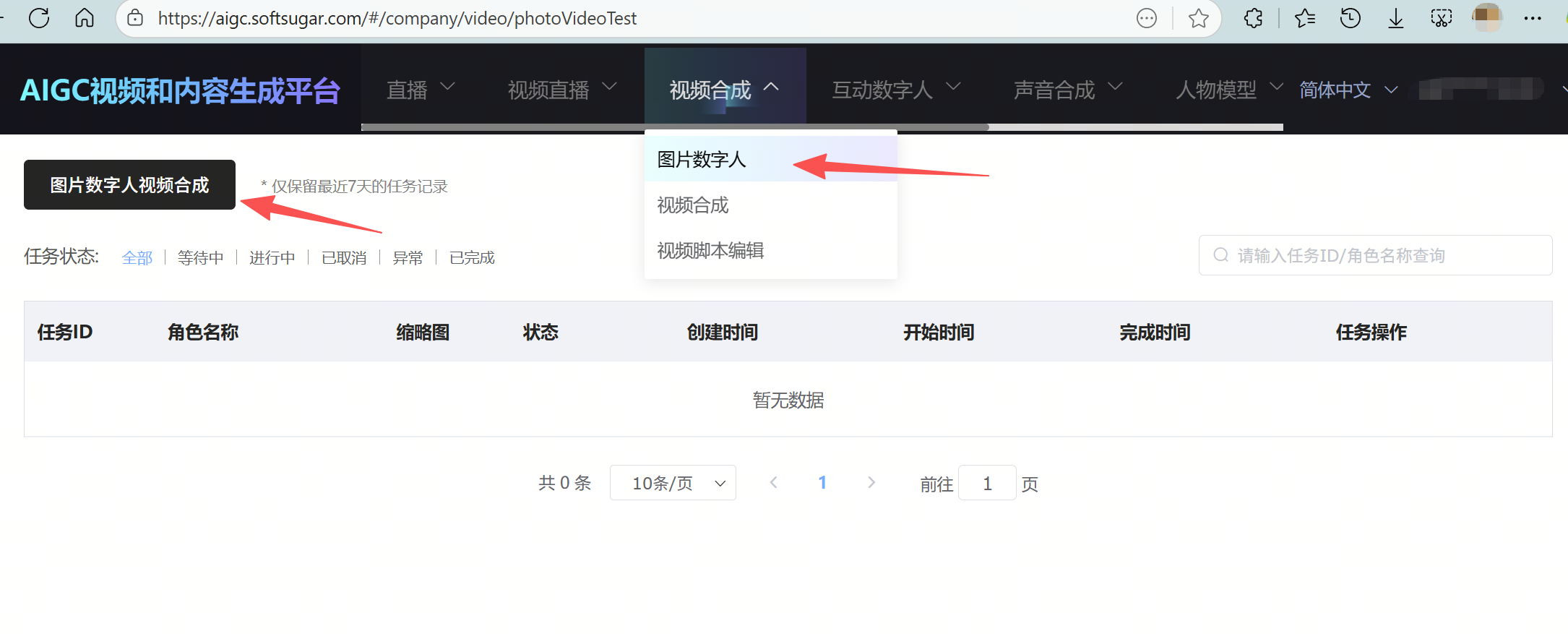
# (1) Log in to the console, navigate to "Video Synthesis" - "Image Digital Human" page, and click "Image Digital Human Video Synthesis";
# (2) Enter the task name, upload an audio clip and an image, select the desired image digital human duration, and click "Confirm" to create the image digital human task;

# (3) On the current task page, you can view the task status. Once completed, you can check the output video.
# Generating Audio from Text
Since direct text-to-image-digital-human-video output is not yet supported, you can first generate audio from text and then create the image digital human. The specific method is:
Navigate to "Voice Synthesis" - "Voice Synthesis" page, select the speaker ID, enter the corresponding text, and click "Synthesize" to output the corresponding audio.
